Minden Main to Main 2013

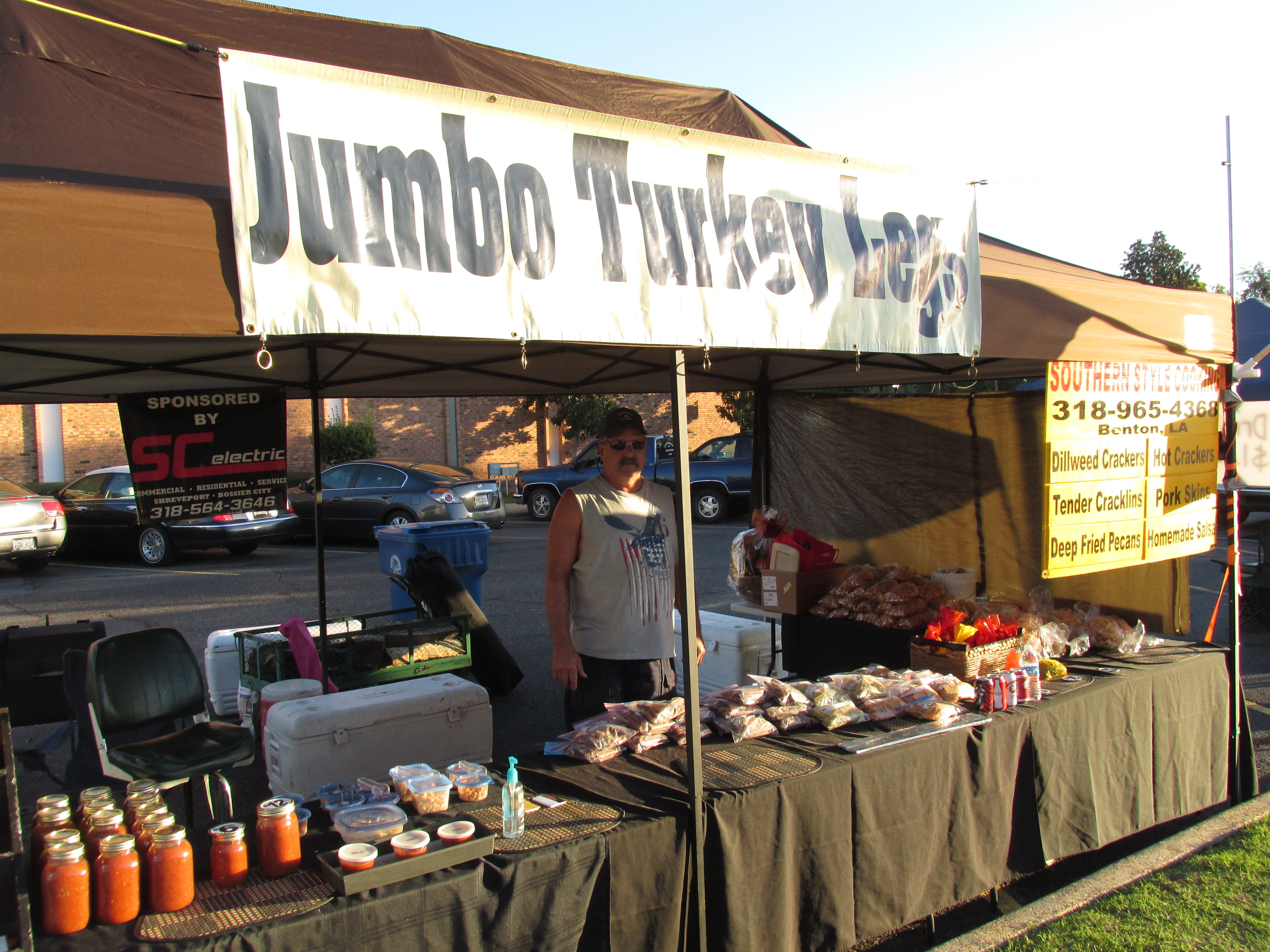
Check out some great vendors from the 2013 Main to Main going on now in Webster Parish. They were nice enough to allow me to snap some photos of them showing off their products and services. This is from day one of the Minden main to main which was filled with lots of excitement from around the community.

I’m looking to add more photos from day two as I take them. But unfortunately I can’t be everywhere from Sibley to Springhill so if you know anyone in the surrounding areas who wants their photo added to the list of vendors below then have them take a photo at their booths, and email them to me at info@colemanmg.com.

Please share this page..

If you have a second I will really appreciate if you can share this page with your family and friends in our local community. This is by far one of the biggest events to come to Minden and the surrounding cities so let’s do our part of spreading the word.

Kodak Moments

More to come…

7 Local SEO Strategies to Boost Your Rankings in Your City

BuyLocal.indd

Google is giving local businesses the opportunity to grow in their city by putting the right tools in play. The average mom and pop store now have the chance to create a presence online, so that the random customer could Google what they want and within less than a second, your place of business listing comes up.

This is powerful because it even caters to the big companies who have small branches all across the country. They’re able to perform local seo marketing on each branch website so that they can dominate even their local area.

Many companies have attempted to do seo to their websites, because they heard it was an effective way to drive local targeted customers to their place of business. The issue is that most of them don’t know where to start, or the changes they must make to their website to even move past the competition until now. I will list some of the things that every local small business needs to be doing to enhance the visibility of their business website in a matter of weeks.


Read This: My 1,000 Words a Day Explained in Full Details

Local SEO Blueprint

The basics of local seo marketing is done on the website itself. This includes the keywords that you want to rank for such as “lawn care services.” Now this is not a local search, because it can be classified as a broad search due to not locking in a location.

What makes local seo so powerful is that Google allows you to put the keywords in your title of the page, and the body of the page. So, if I live in Shreveport La, and I have a lawn care service, then I will make sure the title of my page, and the body of the content of the page will include the local term “Shreveport lawn care service. What Google does is use this information to rank you accordingly compared to the other related websites in your niche.


Read This: 5 Smart Moves I Made That Changed My Success

Local SEO Tips

Content – The content on the small business website should be related to the current location of the term. The example above is “Shreveport lawn care services,” so the content should contain that keyword and content that supports your targeted keyword.

Backlinks – No matter how good or optimized your content is, without good quality backlinks it’s really a waste of time. You need to connect your website to related websites with a link on their site linking back to you. This is easier said than done, because to get people to link to you is a little difficult. What you need to do is to write good content, and ask them to link to by just sending them an email.

Local Keywords – When creating your content, think about the local keywords you can add into your copy. Like in my city I would make sure to add not only Minden, La, but I would also list all of the cities included in Webster Parish. This forces me to key in on all parts of my local market that Google will see as targeted.

Get Mobile – Whenever I’m in the city next to me and I’m looking to find the nearest tire shop, then I pull out my mobile phone. Not only do you need to have a website that’s optimize for local searches, it also needs to be formatted for any and all mobile devices. If not, then this is something I would be doing so when someone search for a product or service in your city then they need to be able to view your website in an easy and useable form.

Contact Info – One of the best ways to optimize every single website is with your information, such as your business name, phone number or address. The best way of dong this is by doing what I did on my website is that I included my business information in the footer of my site. This will produce unlimited content on every page that is targeted to my local marketing. Meaning, if someone searches for my information, then there is a good chance that I will show up in the top positions.

Google Map – I like this form of local marketing, because it really tells the customers who come to your website that you really want them to come in and see you. One of the things you can do is to add your Google map to your website. This is the key to long term success. If you have seen my website, I don’t have one just as of now since I run my business from my home, but when I do get that place of business this will be the first thing I will add to my website.


Read This: How to Find 1,000 Long Tail Keywords in 60 Second for Your Local Marketing

SEO Profiles

Creating profiles are huge in local seo marketing because it allows you to gain full control over your listing. You can optimize for your company name, or the keyword that you want to rank for. I use the 45 profile websites such as Manta, Yellow Pages, and Angie’s List as starter websites I can use as offsite content.

Local seo is not so hard to do when you are equipped with the right tools for success. Just making the right adjustments I listed above, will give you the advantage you need to dominate your local market one search term at a time.


Take a moment and leave a comment and a link to your website so I can check it out. Plus take a second and share this post with your friends who may think its interesting also.

photo credit

How to Find 1,000 Long Tail Keywords in 60 Second for Your Local Marketing

How to Find 1,000 Long Tail Keywords in 60 Second for Your Local MarketingOne of the biggest issues that hunt many website owners is the skills to find long tail keywords. Now it doesn’t matter if you’re going after the whole world or looking to dominate your targeted local market.

You must know how to find these words that people are typing into the search engines if you’re looking to build a presence for your business. One of the reasons I’m able to continue writing 1,000 words a day is because of the long tail keywords I come across.

Like I said, the issue is finding the keywords to even be able to write unlimited amounts of content for your website or any guest posting websites. So, I decided to do this tutorial just for you guys to show you how I’m able to find 1,000 long tail keywords in less than 60 seconds.

This video will walk you through the steps I take to get my content writing off the ground. How I’m able to write for not only my website, but for other targeted guest posting websites also.

Coming up with things to write about can be extremely hard to do, but after watching this video you will have so many ideas about writing content for your local market, that it might just be overwhelming.

Resources I Mention in the Video..

Take Action Today

Personally, I have been using this tool for about 2 years now, and haven’t done another search for my targeted keywords which are “Local SEO and Local Marketing. These are the two keywords I’m always targeting toward my website.

When I’m writing content on other websites, I’m using the long tail that I found by using ubersuggest.org. The keywords I have for these are in the thousands, so I’m creating targeted local and national content around my website.

This means that I’m able to be found all over the internet from the content that I have produced by using this free website. This is something that I think will benefit the readers of this post, and those who watch this tutorial, is knowing how powerful this form of local seo is.

So, take advantage of this website today before your competitors do. I will be going over how to go about creating content with these long tail keywords the way that I use them everyday to grow my business online.

Not trying to push anything else on you, but if you want to be updated in my next video tutorial on creating content around long tail keywords, then subscribe by getting my free ebook.

My 1,000 Words a Day Explained in Full Details

My 1,000 Words a Day Explained in Full Details

This 1,000 words a day strategy is something I been doing now consistently for about two weeks now. I talked a little about this in my August 2013 stats report, which I covered a number of my goals for this month.

Unfortunately, my best friend died and just threw a monkey wrench into my goals for this month. This death kept me from writing a 1,000 words a day for about three days which really hurt my momentum.

You have to be able to market your business to the masses, and do it in a way that it will serve your audience the best. This means staying consistent on any or all of the projects that you’re working on.

This leads me to the reason behind the 1,000 words per day concept. People want to know why do I want to write that many words per day and the entire reason behind it. Hopefully, by the end of this post you will have a clear idea of why I’m doing this, and the reason why you should be doing it also.

The Why

No matter what people say or do, everything in life is done for a reason. My reason behind the 1,000 words is to create over 365,000 words within the next 12 months. Now that is a lot of content online floating around for someone to find it.

The enormous treasure chest filled with content will be directed back to me and my website. This will build creditability online with massive amounts of content, not only on my website but also on other websites.

These other websites are sites that I will be guest posting on that are “like” websites like mine in nature as marketing sites, small business sites, blogging sites, and any website that caters to people wanting to learn how to market a website to the masses.

The more places that I can put my brand, such as, Antonio Coleman or Coleman Marketing Group, then the more reputable my brand becomes. Now at the same time, this gives me more exposure to this site which I will explain more about below.

So, to sum up the (why) it all comes down to building on site and off site content that will be shared to thousands to benefit my website traffic.

The Benefit

Traffic – The #1 reason for doing this is to build traffic to the website by creating content people will love to read. Whether this is on my website or a partners website as a guest post. The content I’m creating is all about getting targeted traffic to my website by creating valuable content that people will share.

–the numbers

I’m looking to only post 2 pieces of content to my blog every week for the next 12 months. Each post is around 1,000 words, so that puts me at 88 posts for the next 12 months which equals 88,000 words out of 365,000 that equals 277,000 words left to post else where.

Now, the 277,000 words left will be put into guest posts, which if you divide that by 1,000 then you will get 277 guest posts on other top marketing blogs online.

So, me being the person that I am when it comes to numbers that I’m looking to seeing at a middle range of 50 visitors back to my website per guest post. This comes from my link being on the guest post website pointing back to my site.

This traffic is calculated in my head from the potential traffic that I will be getting from the guest posting websites readers, and the traffic I will get when shared on Facebook, Twitter, Google Plus and Linkedin.

This is a low number, but I’m looking at the realty numbers because some will come in lower while others will be higher, so I took the medium of the two.

277×50 = 13,850 visitors from guest posting. This not an enormous number, but it is targeted traffic that will convert. So, even though its low I’m still happy knowing that the people who will come to my site are people who will take action.

Important: I even added another 1 to 2 thousand visitors coming to my site because a lot of these guest posting websites syndicate content from these sites. This will mean that they’re bringing me traffic also, and another place for a back link which I will cover now.

Back-links – Getting a link to your site from another website is called a backlink. Now, the only things that I will be linking back to my website from the guest posting websites are my home page or my ebook how I got 474,095 visitors to my website only working 2 hours a day.

These are the main two links I will be pointing back to my website. I’m not really going after seo of any keywords with this, because I want it to be as natural as possible.

277 guest post times 2 backlinks equals 554 backlinks to my website. To go back to the syndication thing, you can expect to at least double this then this comes out to 1,108 backlinks for the year.

Success – Now for the first year these numbers are OK to a certain degree. These numbers are only based on the 1,000 words a day concept, but if I wanted to grow these numbers by being everywhere online, then I could do the following also..

  • YouTube Marketing Videos/tutorials

  • Marketing Podcast

  • Interviews of Marketing Bloggers

  • Forums Marketing

  • Blog Commenting on Marketing Websites

Doing these things above will at least put me over the 50,000 visitors a year mark, which will grow my brand even faster. I’m a one man band on this one, so when the site starts to make good money then I will reinvest it back in getting these things done.

I will be able to hire a team to work around my projects so that we can get them all done simultaneously. I could get these things going now, but I’m working a full time 9 to 5 so I’m only getting about 2 hours or so work in each day.

Once the wheels start turning and rolling on their own, then this will be the time to implement more marketing techniques like I listed above.

Well this is my plan behind the 1,000 words a day concept. I hope you adopt the same plan of action for your own website. Hate to go but I’m at 1,094 words for this post so I have to go till next time.

Comment and Share

RIP to My Best Friend

RIP to My Best Friend  Backup Your Laptop or Computer Before it CrashThis Friday I experienced the worst lost anyone could have gone through. This was my friend for the past three years, and I loved her so much. I’m saying today RIP to my laptop that went home to computer heaven this past Friday.

Yelp, my laptop died and all my dreams died right along with it. You may be asking yourself what exactly do I mean my dreams died along with it. All my documents, photos, videos, seo software’s, marketing tools and any other form of important information is gone.

My hard drive decided to have a heart attack, which I tried to call my computer guy to operate, but found out it was too late. The hard drive is dead, and there is no hope of getting it to ever work again.

How Did It Happen?

First and foremost,every computer or laptop has an hard drive which will fail in the near future. It’s not if it will fail, it’s when it will fail. The sad thing about it is that I know this first hand from using computers for my business for the past 10 years.

After all of the experience that I have in backing up my websites just in case it goes down. I still neglected the fact to backup my computer, even though I thought about it this past week. My plan was to backup it up this month, because it started to act a little funny so the red flags went up for me to do something.

Unfortunately, I was too late to the fight, and it died before I got the chance to (say goodbye) backup my data. Can you say sick as a dog!!! Everything went through my mind from our kids child hood pictures to all of my projects I have been working on when it comes to my websites.

My business logos are gone, music, movies and countless numbers of other important items are all gone to heaven. But, I’m not writing this just to vent about what happened to me, I’m writing this so that it educates you on how not to let this happen to you.

You see below I will show you a couple of things you can do to protect your computer so that you can sleep easier at night. Even though it may look like the world has come to an end for me, but I always bounce back and this is how.

How To Protect Your Computer

First, I would like to say that this is a tragedy in my eyes because of all of my work on that computer. I’m not caring too much about the projects, because I can just keep moving on with the growth of my website without those. What makes me sick are the family pictures, and I know if you’re anything like me, then your family means everything to you.

So for this reason don’t cry for me because there is a solution for me and for you also. For one, the hard drive is completely damaged but if I did want to be able to get the data off the hard drive then I must seek out a “data recovery company” Just for thoughts, I decided to Google a couple of these companies and found out real quick that it will cost anywhere from $500 and up just to get the data off. Ouch

So instead of doing that I decided that it would be best to take my hard drive to Best Buy so that the geek squad can fix it. Yes, it will cost a lot also but at least I can walk into a trusted place of business that I know will perform the job of extracting the data. So this is an option that I will be doing soon, and it will cost me a pretty penny but I’m here to save you a headache by following these steps of backing up your data.

Window Users

Go to – Start – Control Panel – Back up your computer

This is the free way of doing it and the same way I’m backing up my laptop I’m on now. Thank god I had another new laptop in the house, or I would have been in big trouble until I bought a new one. So, what I’m doing now is using this free method of backing up this computer every Sunday night.

Basically, all you’re doing is going into the settings and backup your computer which, can be saved to computer, CD/DVD, email or uploaded to an online server all automatically.

Now, this is what I’m doing every Sunday starting this past weekend to have the system backup my laptop all on autopilot. So if the computer hard drive fails “which it will one day”, then I will have it saved in other places where all I will have to do is download it back to my new hard drive.

Talk about sleeping peaceful at night

My Take Away

What I have learn is to not put things on the back burner till tomorrow because it may just be too late. If you have important things on your computer, then after you finish reading this, I hope that you take the appropriate steps I listed above to protect your data.

Plus, for those of you who have websites then think about backing up your website today also. This is something I know about as well, so learn from me its like losing a family member when all of your hard work online gets lost forever because of hackers or software failure.

Please Leave Comments and Share